On Engines and Crossfades
I’m procrastinating on day job things, so what better time than to write entirely too many words ™ about the making of this game! The technical side, because I’m trying to reignite my programmer brain a bit.
Arbiter (still working title) is built on a custom engine as a web app. The image content (backgrounds, vfx, and sprite portraits) are rendered on a WebGL canvas using Phaser.JS as the rendering layer (mostly out of familiarity – I can write shaders and stuff), and the UI is built on top of that via React.JS. I use Ink as the narrative scripting language, which allows for variables and choices pretty easily.
(The engine is one I’ve been working on since 2019! I’ve managed to bolt it onto Unity and Godot for other projects, but this one I decided to do in pure web land!)
The React layer contains the main ‘source of truth’ state; it runs the ink file, which has commands that can update the Phaser scenes, and stores in it a serialized version of ink state for features such as rollback and save / load. There’s also a bunch of other state there, such as the text box format (used to switch between a full-height NVL textbox vs the bottom of screen ADV one), who the speaker is, character colors, etc. (I took the two screenshots to compare how the UI could look different. Backgrounds and characters on Phaser, everything else in React DOM.)
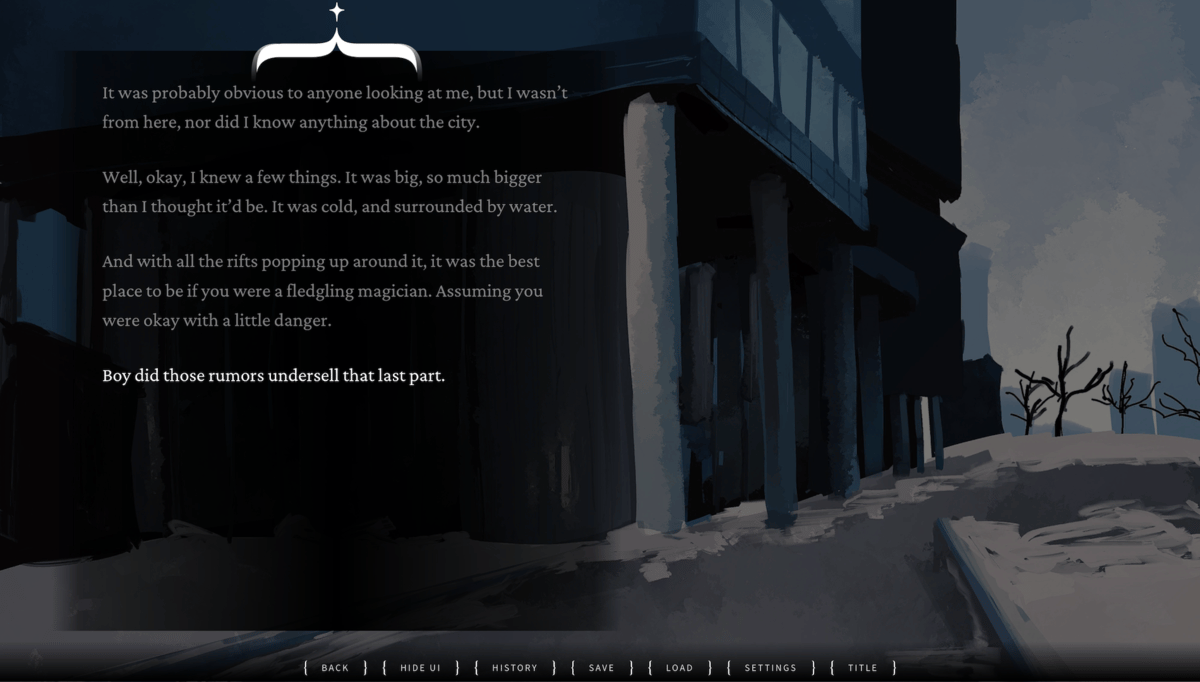 NVL format UI
 ADV format UI
The nice thing about building all this from scratch is that I really intimately know all these details! The annoying thing about building all this from scratch is that I’ve had to think about a lot of things that are extremely solved problems!
Like image crossfading.
If you’re not familiar, this is the term used to describe the transition between two images A and B, where A fades into B without an ‘inbetween’ color. This is used in visual novels all the time to transition bgs sometimes, but more often to transition portrait expressions so that there’s a small animation rather than a 1 frame switch.
The easiest way to implement a crossfade on the web is via an opacity change animation - through the course of the animation, change A’s alpha from 1 to 0, and at the same time overlay B on top of it with alpha 0 to 1. But this will cause a transparent flicker in the middle of the animation!
And that transparent flicker is because…uhh, this is probably easiest with an example – let’s say A is a red square, and B is a blue square, and the background is pure black.
At t = 0, A is fully opaque, B is fully transparent, so you see a red square. At t=1, it’s the exact opposite. But at t=0.5, halfway through the animation, you should see a purple square (half of A, half of B). But if you did the ‘easy’ way, you would not end up with that, because the web engine will draw all the images one by one onto the background, which causes the transparency of A to become ‘conflated’ with the background. So you’d draw the half-transparent A onto a black background, producing a dark-red square, then draw half-transparent B on top of that, producing a dark purple square. Somehow, a little bit of the background ‘bled through’ the animation, even though we expect an image of 0.5 transparency on top of 0.5 transparency to be fully opaque.
This is pretty annoying to work around on the web. You kind of have to change the order of how things are overlaid on top of each other, and make sure that the result has the expected alpha value before compositing the blended result onto the background.
I think in CSS-land, there is now a specific blend mode to do just that - (I saw the details in this blog post, waaay after the fact. In fact I probably could have just linked this post instead of writing all that above), but I don’t think this was implemented into Phaser.JS. So naturally I took the harder route and wrote some custom shaders to do the crossfade.
Anyway, I’m not sure I recommend making your own visual novel engine.
I’m currently still suffering from programming burnout so I haven’t made as many modifications to this engine recently, but there are a few more things I can do to get this game into release-able form. Like keyboard shortcuts! And making sure that the game doesn’t crash on mobile!
Oh yeah the whole thing crashes on mobile for some reason, but only if you’re playing it in portrait mode, and it crashes the whole os. I’ll figure that out eventually.